
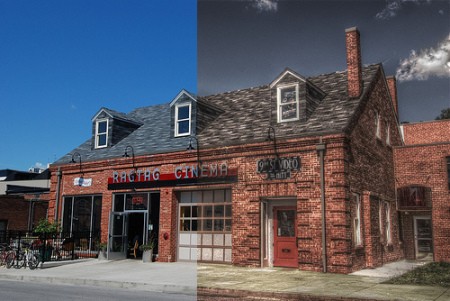
Hack-A-Day friend [Nathan] showed us some of his results creating his own High Dynamic Range images. Three normal Low Dynamic Range photos. One is under exposed, one is normal and the third is over exposed to capture the information needed. Then all three are used to create a single HDR image. Technically, the HDR image contains too much information to properly display, but even this limited version looks damn impressive.
You’ll need a tripod, a camera that allows you to adjust your exposure value and a decent CPU to do the processing. (This pic took a couple of minutes to render on a quad core cpu) You can check out the full HDR photo here and one of the original frames here. For the software side, you can use pfstools on the command line or QtpfsGUI for the graphics side – both are free and open source. [Nathan] suggests a camera with bracket mode and a remote shutter release for best results. If you’re all about theory, you can grab a white paper on the process here.












Any Canon camera can have bracket mode if you install the Canon Hacker’s Development Kit (http://chdk.wikia.com/wiki/Main_Page)
With updated firmware from the above site, you can set your cheap Canon to bracket, taking multiple photos with different exposures to create the base images for HDR rendering. You can use Gimp to manually create HDR images or the above references software.
“…One is under exposed, one is normal and the third is over exposed…”
More commonly known as Exposure Bracketing. Most medium range DSLRs and up should handle this no problem (for example, my Rebel XT can do it automatically).
Personally I detest HDR photos. IMO it takes a perfectly good looking photo and turns it into something that appears to have been regurgitated out of a newbie’s ray tracer.
I’ve done this myself to capture a few unusual and poorly lit scenes. It’s made easier by a camera (Canon Rebel XTi) that can be controlled over USB from a computer/laptop. The enemy is camera movement between shots.
Now with that said, that picture is astonishingly ugly.
Very cool, if I didn’t know I would’ve guessed the HDR image was just a good computer render, as apposed to a pic of something real.
I wonder how these would appear on a higher bitdepth screen? Would a high contrast ratio, 30Bit lcd panel do them justice?
@1
When done correctly and subtly it can provide some great results. Most people however fail completely during the tone mapping process and churn out garbage
HDR can’t(read: shouldn’t) be used in all photographs and it should be used sparingly and as subtly as possible – if used in such a way it can be a valuable tool for photographers to capture otherwise impossible photographs.
Another subject worth looking into is exposure blending which through a somewhat similar process can extend your image’s dynamic range but by doing so without intoducing the telltale HDR signs such has the halos around areas of contrast. Exposure blending: http://luminous-landscape.com/tutorials/digital-blending.shtml
Apparently, ‘HDR’ has become synonym to these types of overly artistic PhotoMatix-esque tonemapped images which – don’t get me wrong – do serve some purpose in the ‘looks nice’ department but are far from what I would consider HDR to be: a method to overcome limitations of (digital) cameras with regards to recording lightintensity, creating a realistic looking photo.
1, 6, 7: I agree. People seem to automatically associate “hdr” with these oversaturated bizarro pictures, when (iirc) the original point of hdr was to extend the dynamic range of the camera to get more lighting detail out of a shot like a sunset.
I’m not normally one for plugging but there’s an instructable on how to do hdr (the subtle lighting-enhancing sort not the surreal photomatix sort) with no magic tools or downloadable photoshop actions, just a few simple photoshop/gimp procedures at http://www.instructables.com/id/HDR-photos-with-the-GIMP/
I apologise for the incredible wordiness, if you know your way around the gimp you can probably do it in half the time I described there (I was a n00b at the time of writing and haven’t updated it yet).
Is everyone too lazy to buy the right filters and gear to take photos anymore?
A plate filter mount and a good gradient ND filter will do most HDR work that people are after. I have used 2 Gradient ND’s in a plate filter on the front of my Rebel XT to create pretty much the top image in one single click of the shutter.
Digital photographers should be forced to shoot film for a few months to actually learn photography before they touch a digital.
YES! There is a place for HDR, but 90% of the photos, if shot right would not need it.
i think its a great way to capture images, the result would be more like as it was captured by our eyes
few days ago i was scanned a very little part from a cd-rom (the photo-detector) with my scanner and the result was not so great, but as i converted the picture to lab color space from rgb i’ve noticed how much more information was in the two color channel so i was converted the lightnes and the two color channels to one grayscale image and adjusted the levels, the result was a more informative image…
It, personally, annoys me when people refer to tonemapped images as HDR. They are two very different things.
As for the continued discrepancies between unaltered photography and HDR/Tonemapping, I feel that both have their place. Each can be visually appealing, depending on how presented. It took me a while to even want to switch to digital, simply because I felt it was destroying my creative process.
QtpfsGUI is an awesome piece of software, if you’re looking for multiple tonemapping algorithms to play around with. I don’t recommend running every photo you take through here, but some are going to be breath-taking, just like a well-composed photograph.
I don’t really consider the surrealistic looking images to be true HDR (High Dynamic Range) images, but more of a byproduct of applying a HDR process (just think of it as another filter or action in Photoshop.) IMHO, true HDR images should capture what normally would have been lost in the limited latitude in a film image or digital sensor. More closely reflecting what our own eyes are able to see of the scene. Here’s some HDR images that I did at my vacation last year (yeah the first one does look a little halo-y around the top of the hills, but I couldn’t get it to blend with enough luminance otherwise.)
http://leftyloosy.com/lakepowellhdr.aspx
http://www.vgcats.com/comics/?strip_id=224
i am really sick of the ‘brown is real’ movement in graphics. seriously guys, its getting annoying. i’m sick of seeing perfectly good images washed out.
As the one who created the linked images, I wanted to respond to the comments here.
First, to those who express the sentiment that the only ‘valid’ HDR is the kind that uses the more realistic tonemapping algorithms…get off your high horse please and step down to Planet Earth. There is no *right* when it comes to Art, or any medium used to create it. When I created the images above, I intentionally selected my tonemapping algorithm and variables to trash them up. My intention was to create something gritty and convey the feel of the revised-urban nature of the downtown where I live while leaving them unretouched in the traditional sense. The intent wasn’t to accurately render them in the sense that WYSIWYG, the intent was to create art. Duh.
Second, there seems to be some confusion though in that some folks think that many of the HDR images they’ve seen have not been tonemapped. You can choose to not tonemap an HDR image but it will look like crap on a regular monitor…will seem like it needs a major contrast adjustment. Nearly *all* HDR images that you see on a regular monitor have been tonemapped, but some algorithms just produce a more realistic result than others. In fact, you can see this in another item in my HDR set (the Sears Tower view). Again though, for these images I made a specific choice in my tonemapping algorithm to achieve a specific artistic result.
Finally, if you just don’t like them that’s perfectly fine by me. Quite honestly, that’s what art is all about and there’s no accounting for taste. Even bad taste.
well i find deeply disturbing that it almost looks like a CGI render you would normally find on PC games (well, maybe not nowadays, these kids with their gaming rigs and such…).
hi
i download the programs i will give it try
thanks
I wanted to comment and thank the author, good stuff
I have been using QTPFSGUI for a few years now!! It’s great. Check out my tutorial at http://www.freehdr.blogspot.com
There is a lot of negativity toward HDR images and new techniques but there always is at the beginning. Give it a try!!