Hackaday Links Column Banner

Hackaday Links: June 14, 2026

Times are tough out there, and many are starting to feel the pressure at the grocery store checkout line or the gas pump. But whenever you start to worry about affording life’s necessities, take comfort in the knowledge that somebody is so flush with cash that on Friday they decided to treat themselves and spend $3 million for a sealed copy of Super Mario Bros for the Nintendo Entertainment System.

Although we’re not going to say it necessarily justifies the insane price — a new record for the most ever paid for a video game, incidentally — Heritage Auctions does note in their press release that this is an exceptionally rare version of what’s admittedly one of the most iconic pieces of software ever produced. This is only one of three copies of this particular variant known to exist, which Nintendo apparently distributed to test markets in the United States ahead of the game’s official 1985 release.

In slightly more modern gaming news, Asha Sharma, the new head of Microsoft’s Xbox division, has been making some big swings to try and get Microsoft’s gaming division back on track after years of declining sales. As part of that effort, she recently penned an article detailing some of the challenges the company is facing, which includes some interesting hardware details.

According to the blog post, she claims that in February, the cost of memory and storage components for the Xbox console had doubled compared to the previous year. But those numbers have jumped again, and by the time the holidays roll around, she expects they’ll be paying five times what they did in 2024. That’s bad news for anyone looking to put an Xbox under the tree come Christmas, but even worse news as the company works on the console’s successor. Considering that today’s hardware from Sony and Microsoft can already set you back $700 USD depending on which version you get, it seems like we’re approaching a point where gaming consoles could price themselves out of the market.


Continue reading “Hackaday Links: June 14, 2026”

Process 4 Billion Pixels Per Second From 16 DIY Cameras For The Best V-Tubing Rig Ever

[Dennis] is on YouTube with his channel “Made By Dennis,” but for the record he is a maker, not a V-tuber. On the other hand, his latest project– creating a profesisonal-level tracking rig with DIY IR cameras and a whole lot of moxie–does mean he’s now equipped to make the move to the prestigious, high-status world of pretending to be an anime girl.

That is of course not why he did it. Like most projects around here, the motivation was more a case of “I wonder if I can…”– in this case [Dennis] wondered what it would take for him to pull off the same sort of optical motion capture, or MoCap, that is used in Hollywood studios. Optical mocap has the advantage of being very precise, able to track things at high speeds, and not being in any way limited to the human form like the slew of AI-assisted methods hitting the market right now. The disatvantage is that you need to place markers on any part of your subject you want tracked, film them from all angles, and process a whole lot of pixels. In [Dennis]’s case, it ended up being about four billion. Keeping in mind that actually locating those points in 3D space is dependent on knowing exactly where your cameras are: if you want sub-millimeter precision, your cameras need to be fixed with sub-millimeter tolerance. It’s a big project, hence a long video, which is embedded below.

The DIY cameras use a AR0234 MIPI camera on a custom PCB with M12 lenses and IR filters. To improve the signal-to-noise ratio on optical MoCap, it’s standard to use near-IR light. The camera boards, as you might expect given the MIPI interface, hook into Raspberry Pi compute modules– the cheapest CM4 should work, though he’s using CM5s. The compute modules sit on custom boards that provide PoE, and some other niceties– like a small microcontroller driven by the pulse-per-second pin to help trigger the cameras in sync.

Each camera gets a ring light of near-IR LEDs that pulse at 160 W, which would be way more than PoE is specced to provide, but since the LEDs are only on when the camera is taking a frame, the average power is well within allowable limits. With 16 cameras each having their own ring light, that’s a lot of near-IR photons. Don’t forget your safety squints!

Rather than process the images with OpenCV, he has his own custom solution optimized for this use-case that [Dennis] reports is 300x faster. Luckily, he’s put his implementation on GitHub, along with the rest of the project. Even if you don’t have any v-tubing ambitions, this project is very impressive and worth checking out in its entirety.

Optical MoCap isn’t the only game in town, of course. If you want to do this cheap and easy, you can strap a bunch of IMU sensors to yourself– just don’t expect the same precision.

Thanks to [Dennis] for the tip!

Continue reading “Process 4 Billion Pixels Per Second From 16 DIY Cameras For The Best V-Tubing Rig Ever”

Giving A Power Mac G4 A USB Upgrade, For Free!

At various times in the history of desktop computing, the market has stubbornly refused to follow the path dictated for it by a dominant manufacturer. IBM’s move to MCA in their PS/2 line is one of many examples. Another is Apple’s take on USB a couple of decades ago, when their view of the future lay with Firewire 800. [Pierre Dandumont] has revisited a Power Mac G4 from that era and unleashed what Apple never did back in the day: a USB 2.0 port. (French language, Google Translate).

The hack lies in Apple shipping the machine with an NEC USB 2.0 controller, but only using it for USB 1.1. A PowerPC Linux distro will happily use it for USB 2.0, but Mac OS refused. Replacing the BIOS ROM with an image designed for the same Mac without Firewire 800 cured the problem, but at the expense of being so we’re told irreversible.

An obscure set of Macs from the early 2000s with an odd combination of hardware and OS may not count for much in 2026, but back in the day having USB 2.0 was a big deal and this would really have mattered. We like it that he put this together, even if the chances of having a G4 on the Hackaday desktop probably isn’t too high.

This isn’t the first USB hack we’ve seen for a PowerMac G4.

Powering Up A Pluggable Module From The 1948 IBM 604 Electronic Calculator

In that awkward transition phase between electromechanical accounting systems used in the 1940s and the introduction of fully digital computers we find systems such as the IBM 604 Electronic Calculator, advertised for accounting, calculating and engineering tasks. While not capable of complex instructions, loops and other advanced features, it did use an interesting modular architecture with easily swappable modules containing a vacuum tube and associated components. Recently [Ken Shirriff] took a poke at one of these and even powered it up.

This kind of pluggable system would become a staple of computer systems, as they enabled the use of modules or cards with specific functions that could be swapped and combined at will to increase system flexibility, lower costs and make repairs a snap. For the IBM 604 a total of about 1250 vacuum tubes were used, apparently all of which were found on these pluggable modules.

The module that [Ken] got his hands on has a thyratron tube, which is effectively a high current switch and rectifier. In the short demonstration video you can see it being used to switch a lamp on and off, with further details explained in the article.

Despite being rather limited in its functionality and limited by the punch card input and output speed, the IBM 604 was still a smashing commercial success with over 5600 units produced. A transistorized prototype version with 2200 transistors and 95% less power usage was created in 1954 that formed the basis for the IBM 608, the world’s first commercial all-transistorized calculator.

The 608 didn’t last too long, however, as at that point the breakneck pace of semiconductor technology meant that any newly released product was already obsolete by the time it hit the market. Despite this, fundamentals like pluggable modules would keep showing up over and over, ranging from the 1950s Bendix G-15 to even modern day systems, including PCs with pluggable RAM and expansion cards as well as mainframes where hot swapping of even entire CPU modules is just another feature.

Continue reading “Powering Up A Pluggable Module From The 1948 IBM 604 Electronic Calculator”

Over-Engineering An FDM Spool Holder From Prusa Mk4S Remains

Unlike resin printers where you generally just pour the fresh resin into the easily accessible vat, FDM printers need to squirrel away at least one spool and its requisite holder somewhere. For bed slingers this generally means a top-mounted spool holder, while for CoreXY enclosed printers they can appear on the sides, top or – inexplicably – on the back. While a side-mounted spool is often convenient, access to the side can still be blocked, in which case you do what [3D Maker Noob] did and over-engineer a fancy top-mounted spool holder.

The problem started after converting a Prusa Mk4S to a Core One using the conversion kit, which changes the position of the spool, forcing him to work around not having access to the right side of the machine where the default position is. After a first version using many of the left-over parts of the original Mk4S to create a fancy box-shaped spool holder, he proceeded to upgrade it as detailed in the video. All project files and instructions are available on Printables.

The result is a box you stack on top of the printer somewhat like a multi-spool box, just flatter and with a flippy lid on the front from which a rail slides out with the magnetically attached spool holder. A spool holder which you naturally can further customize to fit different spools. Even if over-engineered, you can’t deny that it would fit in confined spaces and looks pretty good while doing its job.

Continue reading “Over-Engineering An FDM Spool Holder From Prusa Mk4S Remains”

Game Dodecahedron Runs AArch64 Assembly

Operating systems are great things to have for general purpose computing, but sometimes they can just get in the way. There’s RAM overhead and processor cycles required for all that operating, after all. For something like a game system, it seems unnecessary. The NES certainly did well enough without an OS, as did its various successors for several console generations.

[Inkbox] wanted to get back to those heady days by programming bare-metal games for a Rasberry Pi 3 that had sat unused since 2016. Games are on cartridge, running bare metal, in assembly — as God and Masayuki Uemura intended. Also, the console is a dodecahedron, because the name GameCube was already taken.

The GitHub link above doesn’t exactly have documentation, at least as of this writing, so you’ll need to watch the video to get the full details. The dodecahedron form factor might not be ideal for packing away in a bag, but as a handheld we have to admit it does look comfortable to hold. Two faces of the dodecahedron get a half-dozen buttons each, which are wired to a GPIO pin on the Pi via a Schmitt trigger for hardware debounce. Like all good consoles, it uses cartridges, these ones being adapted from SD cards on large PCBs derived from a project we featured before.

That all sounds great, but it’s the assembly programming we’re really interested in — skip to around the seven-minute mark in the video for that. Ultimately it’s a build video, so not the ideal tutorial for ARM assembly programming, but it might not be a bad introduction for some. Unfortunately you don’t get line-by-line of the PacMan game he put together — but he does have it in the repository for you to examine. The repo also has STLs if you want to make a dodecahedron of your own.

Of course he’s got a RetroPi cartridge as well, loaded with emulators, and we suspect that’s mostly how this GameDodecahedron will get used. Still, we’ll always have a soft spot for assembly code and projects that use it — be it on ARM, good old 6502, the open-source RISC V architecture, or even the absolute monster of op codes that is x86.

Continue reading “Game Dodecahedron Runs AArch64 Assembly”

4-bit Relay Logic Counter Begs To Have Its Buttons Pushed

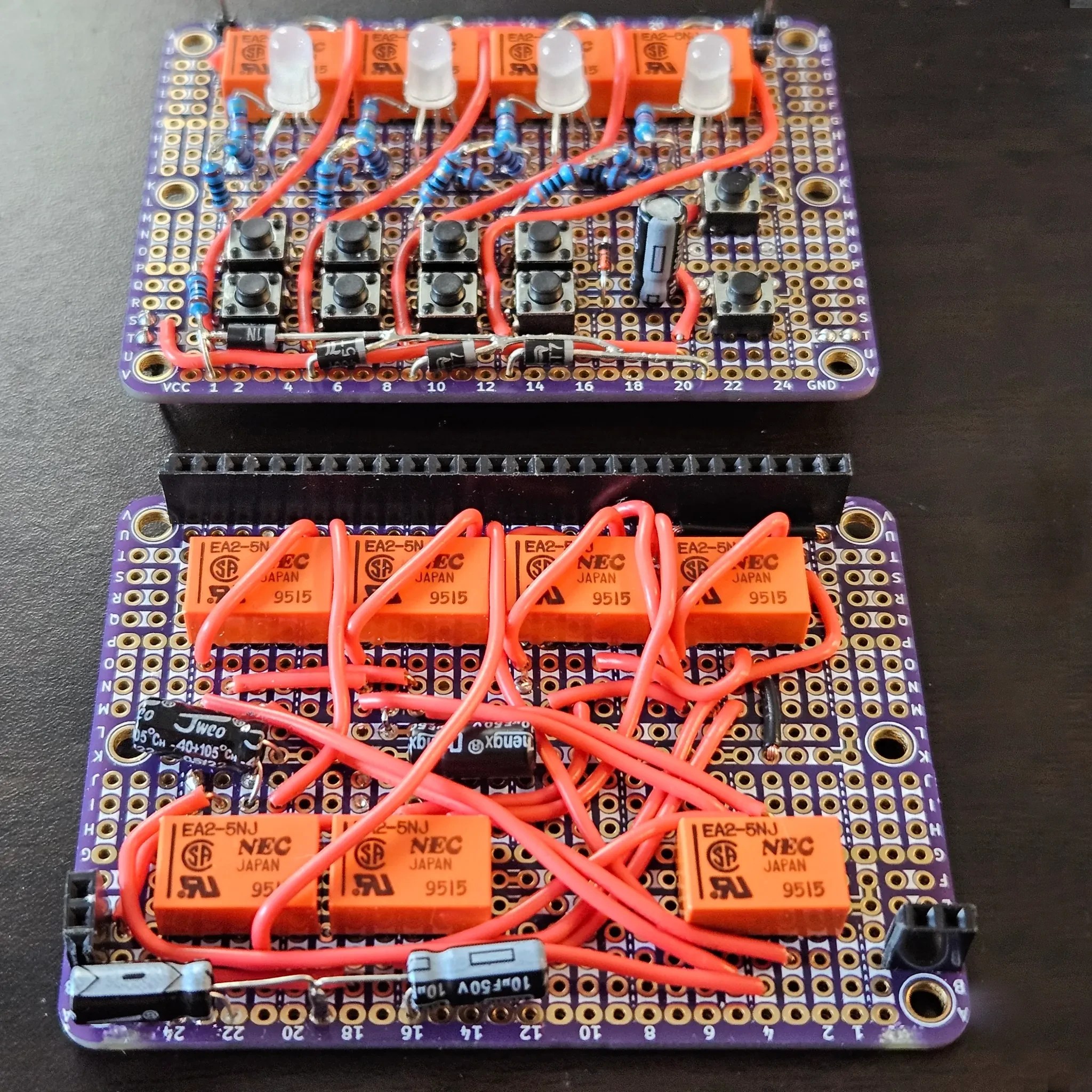
What’s one to do with some nice little relays of questionable pinout, and prototyping board? How about a quietly clicky 4-bit counter using relay logic with tons of buttons?

The register with LEDs and buttons is on the top board, the incrementer on the bottom board.

[Agatha Mallett] made the counter after finding herself in possession of a quantity of relays burdened by terrible documentation (the datasheet shockingly lacks a pinout, and doesn’t even mention the coil being unidirectional). But since the relays are also small and of decent quality, they were a good candidate for a small relay logic-based project.

The key to the build is implementing D-type flip-flops using relays. This is done by holding the coil voltage of each relay between its set and release voltage levels. A small voltage bump will energize the coil, closing the relay and leaving it closed. Conversely, a small negative spike releases the coil, leaving it open. This forms the basis of the counter, and [Agatha] has a separate write-up all about the details of using relays in this way.

Implementing this was rather less straightforward than it may sound because it relies on balancing the coils of many relays on a figurative knife-edge of voltage, but not every component is perfectly identical. A tweaked resistor or capacitor here and there was needed before things settled into reliability.

The end product has indicator LEDs, buttons to increment or clear the current count, and it even has buttons to set or clear individual bits. This is a project that begs to be interacted with, and there’s a short video on the project page so you can watch it go through its paces.

Thanks to [Jess] for the tip!