
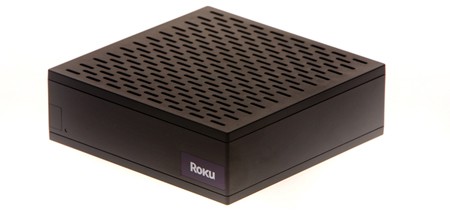
The market is flooded with new media streamers, but which one is for you? One of the cheapest and easiest options is the unambiguously titled Netflix Player. With an active account, the Netflix Player streams movies and television shows from their online library (currently around 10,000 videos). It connects to the internet via 802.11b/g WiFi or ethernet, but delivers low-quality video if your connection speed is less than 1Mbps. It costs $99 plus at least $8.95/mo for a Netflix subscription. It runs Linux so hopefully we’ll see some hacks for it soon like we did with previous Roku products. A fine device, if you want to stream movies and nothing else, but if you want to stream data from other sources, like a network, usb hard drive, or (gasp) bittorrent, you’ll have to look elsewhere.
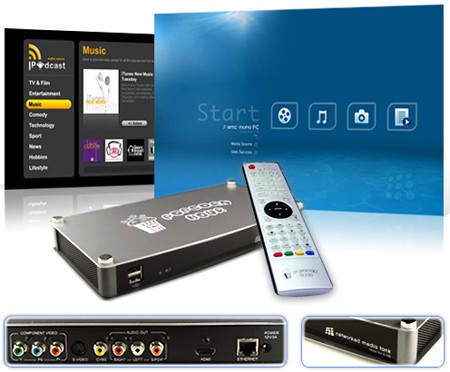
A friend of ours recently purchased the Popcorn Hour. This set-top box can stream video from a network or usb hard drive using practically any codec or container format, can be configured to download torrents with an internal hard drive, and supports a number of web services including YouTube and Flickr. The Popcorn Hour is at least a fair value at $180. The downside? It doesn’t come with a hard drive or WiFi.
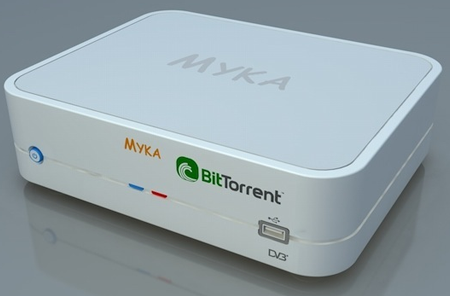
The lack of internal storage might be deal-breaker for you; if so, the Myka could be a better fit. In addition to coming in 80, 160, and 500GB flavors, this device opts out of all proprietary content delivery services in favor of open ones. It has strong synergy with BitTorrent.com built in, downloading directly from it or a number of other torrent services like ISOHunt. Prices range from $299 to $459.
If you’re like us, you’d rather build your own Linux media streamer. All you need is a spare computer. Cheap graphics cards with component out are fairly easy to acquire. For a frontend, you could use DVR software like MythTV, but that might be overkill. Check out the Linux port of XBMC which is what the Mac version of XBMC we covered previously is based on.












I don’t think lack of wifi is really a downside for these kinds of products, since speed matters here.
As for the DIY alternative, I’m still searching for one that isn’t its own distro and will only use a specific screen. I’m trying to avoid using a second box and just putting it on my home server.
I just bought a Roku player today and I’m looking forward to the idea of streaming the netflix library. If ‘Netflix capatability’ is a published standard then we need to persuade the Xbox Media Center devs to make XBMC a compatible player. This would be the best of all worlds. The Linux XBMC is exciting but who when it will release.
Also have a look at the SageTV media extender. Working well for me, and I don’t even use it for the DVR capabilities for which Sage is known (me=music & photos, mostly). (http://www.sagetv.com/hd_extender.html , $199)
@dandin:
A hard-wired connection doesn’t mean more speed. My wifi is 54mbps…usually manages to transmit that speed fairly reliably, though it does sometimes drop into the 20s…but since I have yet to see any ISP offering anything near that high (Well, FIOS may have something in that range), so it doesn’t matter much. What’s the difference between 54mbps and 100mbps for the LAN if you can only connect to the outside world at 6mpbs?
@urza:
The difference is that just because you’ve got a 6mbps downstream on your internet connection doesn’t mean you’re going to be streaming on that connection. What about videos/music/what-have-you that are already saved on another computer?
Not to mention there is also gigibit ethernet in people’s homes as well.
@urza:
It doesn’t make a difference for streaming from the net, but it does if you’re trying to stream 1080p video from a NAS or similar.
Best bang for your buck is to grab a used xbox from gamestop, softmod it, and install xbmc.
You need:
– xbox ($40)
– dvd remote ($10-20)
– memory card with exploit saves on it
– splinter cell ($1), used to run the save exploit, there are a couple other games that work too but you need specific versions
If you don’t know someone with a modded xbox that can copy the saves to a memory card for you, you can build a cable that connects a usb flash drive to the xbox with a $2 xbox breakaway cable and the female end of a usb extension cable (just match up the wires, yellow doesn’t connect to anything).
I would be so over the roku as a replacement for my xbox if people could get it running xbmc. The xbox is nice and all, but a bit big for what I need.
Hi,
I use an old P4 PC and a piece of software called media portal (www.team-mediaportal.com), it does everything that MythTV does (and then some) and all for free.
Regards,
Paul
My problem with buying instead of building is that I haven’t found any devices which can handle a stream directly from my HDHomeRun. Which would be nice since a lot of times I just don’t care about pausing live tv if I can flip channels fast.
Re: connect speed: Even though your wireless may say 54mbps, I doubt you’re getting that throughput. If you’re trying to stream say, full bw BD 264 content, it can be an issue. I have no problem with the popcorn hour not having wireless. It’s cheap, it can play 1080p x264 content, and even if you buy a HD it’s cheaper than that myka one.
I’m planning on picking up the A-100 in a couple weeks. I have a long history of using PCs running mythfrontend, and I will continute to do so, but the advent of HD content and the absolute lack of HW accel under linux for it makes the system requirements a bit much. For less than the price of just the CPU/MB I’d need to playback 1080p smoothly (if the forums, et al are to be believed), I can pick up the popcorn hour, which will play anything I can throw at it. Plus it’s small, portable, and with no moving parts (minus a HD, which I don’t plan on installing), ostensibly quiet. I can leave all my loud file servers in their own room where they belong, and have this nice quiet little box by the TV that does only what it needs to do, and does it well.
If HD’s not a big deal, the softmod xbox is of course an attractive option.
@ Urza
Wifi is also unreliable. Especially if you have several walls/floors between the client and router. Even if you stay connected at 54mb/s, interference and lost packets can cause extrem instability in streaming media. I have my xbox360 connected to a media machine via wifi and even lower rez videos get very choppy and sometimes just drop alltogether even when the signal is strong. But I also blame that one the 360’s lousy media support.
Step 1: buy a PS3
Step 2: there is no step 2 =-)
(unless any of your media isn’t MPEG2, Divx, or AVC, in which case you better start transcoding =-)
@9: you can also hotswap your hard drive. It’s, uh, a bit terrifying, but I’ve never had a problem with it — it should be fine if you’re careful. You just open your xbox, turn it on with no AV cable connected, then wait till your power light starts flashing. Then, you pull the data cable from your hard drive (eep, I know), and plug it into your PC. It’s still getting power from the Xbox, so the unlock command that’s already been issued stays in effect. Then, boot xboxhdm (it’s a livecd) and copy your saves over. Easy-peasy.
If my ol’ Xbox hadn’t died on me, I’d still be using XBMC. Their MythTV plugin was great. As it is, I don’t have enough hookups to use my new-gen systems *and* the old one, so I do most of my streaming to the PS3, but I still don’t quite like the interface as much.
i say build (if you frequent hack a day you should have the skills)
i use TVersity. http://www.tversity.com pretty stable, on the fly transcoding, uses few resources (so it will run on about any PC, but i run it on a poweredge), can stream to a large variety of devices, also can include web services such as youtube, metacafe, etc. of course you need something to stream to…i use my xbox 360–but it will stream to almost anything. also will stream across the internet (if you wanna open up your firewall).
overall im very satisfied and its free!
I use the Free ORB. They have been working on their solution for years now. I am using it to schedule recordings on my PC and stream from any network place. Quality is as good as bandwith allows and a multitude of platforms are supported.
They also provide an easy to use API that interfaces with the services.
http://www.orb.com
I have a Roku and wish I had not purchased it. Most of the time it works fine, but sometimes the video will get stuck in a look, or the audio and video get way out of sync (like 5 minutes out of sync). The videos play fine on several PCs, but only the Roku has this problem. Very frustrating when it happens towards the end of a movie.
I stopped using it.
I contacted Roku support to return it inside the 30 day window, and they said they would try to fix things, and would still allow the return if problems persisted. Well, problems continued and they won’t allow return of the player.
Stay far, far away from Roku.
Hey there peeps, I just wanted to holla and tell you that I found a great site. For those of you who don’t want to spend unwise amounts of money on ppv fees to watch UFC 108 online FREE in full high definition. Far Better then spending $55.95 on it eh?
at last the information i needed thank you.